Archive for the ‘google book search’ Category

Friday, December 17th, 2010

Romeo and Juliet, with—Get your mind out the gutter!

Today Google released its Books Ngram Viewer, a remarkable statistical snapshot of the books in Google. The New York Times did an nice piece on it.

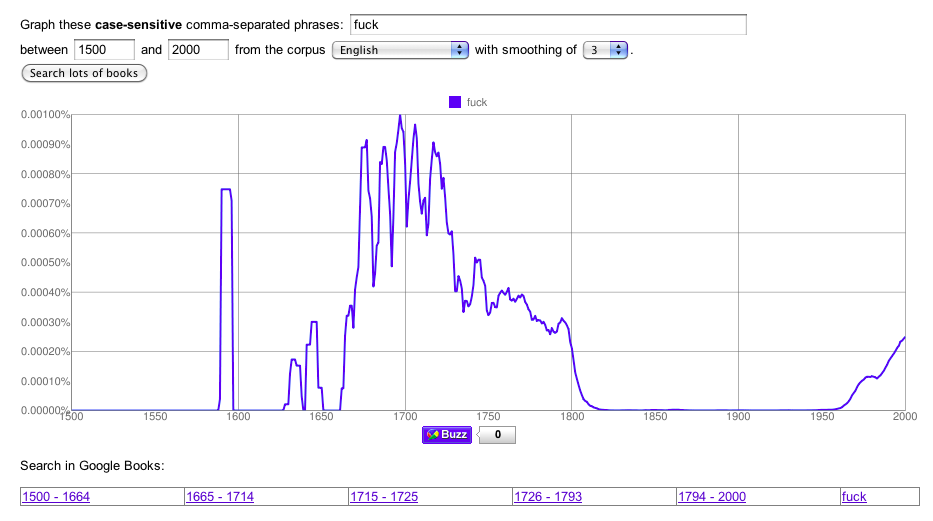
So I went to work on it. My guess was that, like much else with Google books, the data was ratty. It didn’t have to look far. At first glance this chart appears to show that “fuck” had a remarkable early history—being more popular in 1725 than even today! (link)

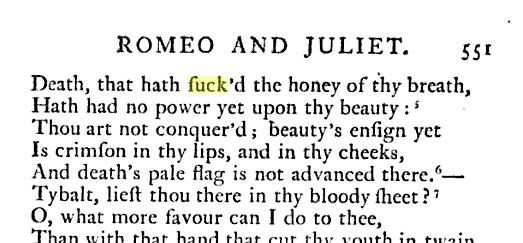
Don’t get too excited. A quick search on the phrase in books between 1700 and 1800 treed the cause:

Yes, Google can’t tell between an f and an ſ, the “s without a bar” more properly known as a long, descending or medial s. To the disappointment of many, Shakespeare wrote “suck’d.” The effect pops up all over. Here’s a graph of “crimſon” vs. “crimson.” If nothing else we can now follow the demise of the ſ with precision.

There’s no question this is a cool tool. But given Google’s grand ambitions and how common s is in English, it’s a pretty startling lapse.

Labels: google, google book search, humor

Wednesday, July 30th, 2008

Google goes after the Library of Congress for “mature content”

UPDATE: They relented. Woo-hoo!

LibraryThing shows Google Adsense ads on a small number of templates. The ads appear only if you’re not a member at all—paid or unpaid. They don’t make much money, but we’ve never had a problem with them.

Today I got a form letter from Google, alerting me that Google had detected “adult or mature content” on LibraryThing. They gave one example, the LibraryThing.fr page for the Library of Congress Subject Heading (LCSH) “Erotic stories.” No doubt some algorithm caught a few keywords, like “sex” or the common porn-word “Lolita” (it’s a book, guys).

Needless to say, they run ads against most of these books on Google Book Search. Our competitors, who all rely on Google Adsense for all their revenue run ads against the same books, apparently without incident (although, I suppose, one can hope!). I must therefore conclude, the problem is the Library of Congress Subject Headings, and that it’s a good thing the Sandy Berman-inspired LCSH “Strap-on Sex” hasn’t made it into LibraryThing yet!

A follow-up email triggered another form-letter, including the helpful suggestion to remove content like:

“image or video content containing lewd or provocative poses, strategically covered nudity, see-through or sheer clothing, and close-ups of breasts, butts, or crotches.”

I have accordingly been consulting with Casey on how to remove all the butt-shots from the Yale University MARC records.

I have three days to comply or be terminated. So, what do I do? Clearly I’m not getting anywhere with their response system. And LibraryThing has something like 100-millon pages. Should I start running pages against keyword lists before showing Google Ads?

That sounds like a big pain, I’ll tell you—and not worth it.

Labels: ads, google, google book search

Friday, June 6th, 2008

Covers from Google: Too good to be true?


I created this cover (well except for van Gogh’s contribution). You may use it!

A few months ago when the Google Book Search API came out, I was among the first notice that GBS covers could be used to deck-out library catalogs (OPACs) with covers, potentially bypassing other providers, like Amazon and Syndetics. I subsequently promoted the idea loudly on a Talis podcast, where a Google representative ducked licensing questions, giving what seemed like tacit approval.

It seemed so great–free covers for all. Unfortunately, it now seems that it was too good to be true. At a minimum, the whole thing is thrown into confusion.

After some delay, Google has now posted–for the first time–a “Terms of Use” for the Google Book Search API (http://code.google.com/apis/books/terms.html). If you’re planning to use GBS data, you should be sure to read it.

The back story is an interesting one. Soon after I wrote and spoke about the covers opportunity, a major cover supplier contacted me. They were miffed at me, and at Google. Apparently a large percentage of the Google covers were, in fact, licensed to Google by them. They never intended this to be a “back door” to their covers, undermining their core business. It was up to Google to protect their content appropriately, something they did not do. For starters, the GBS API appears to have gone live without any Terms of Service beyond the site-wide ones. The new Terms of Service is, I gather, the fruit of this situation.

Now, I am not a lawyer and I am not a reporter. I don’t know who, if anyone, messed up. Nor do I fully understand what the new Terms of Service requires or allows. Although I am told they put the kibosh on using GBS as a replacement for other cover providers, I can’t find a straightforward prohibition on using GBS for covers, primarily or secondarily. But it starts out with the statement that:

“The Google Book Search API is not intended to be a substitute or replacement of products or services of any third party content provider.”

And there are other concerning clauses. There is a vague bullet about not posting content that infringes any other parties’ “proprietary rights.” And there are clauses that should give pause to many on the library-tech listservs–about not reordering results, not crawling, not caching, and so forth.

My interest in free data is well known. I think the days of selling covers—something publishers give out for free—are passing away. But if this happens, it must be done fairly. Those who provide proprietary data should be able to protect it, at least as far the law allows them to. (Since no data suppier can “copyright” their cover images, any restrictions must be based in licenses.*) Those of us who argue for free data** must respect this. That’s the difference between “free as in freedom” and “free as in ‘fell of a truck.'”

Meanwhile, being among the most vocal proponents of using GBS for covers—and having no idea the covers’ weren’t Google’s to do with what they pleased—I have been asked to sensitize librarians that “some of this content is licensed and they need to be respectful of infringement issues.”

So, that’s the word. Now if I only understood it.


*And, I gather, there is some doubt about “posted” licenses on publicly-available websites, as opposed to licenses that require explicit agreement. By the way, did you know that, by reading this, you’ve agreed to dance on the table like a damn fool next time you hear the Gypsy Kings? Do not disregard this license. We’ll know.
**At least those who believe in the right of contract or property.

Labels: book covers, google book search

Sunday, April 13th, 2008

“Library 2.0 Gang” discusses Google Book Search API

Here’s a quick heads-up for those interested in the Google Book Search API. Talis’ new “Library 2.0 Gang,” of which I will be an occasional member, covered the topic

Importantly, they managed to get someone from Google, Frances Haugen, in on the call. Ms. Haugen was diplomatically non-committal about the terms of service, but telegraphed benign latitude.

I ended up talking too much (what’s new), but I did surface the most interesting thing about the GBS API for Libraries: using their API to add free covers to the OPAC, and the rise of JavaScript-based OPAC enhancements. I covered the former here. The latter is also take-away from LibraryThing for Libraries
Check it out here.

Labels: google book search, library 2.0 gang, talis

Saturday, March 15th, 2008

Free covers for your library, from Google

On Wednesday we added integration with Google Book Search, and talked about it on the main blog. We did it together with a number of cool libraries.

My thoughts are still percolating, but I wanted to throw out a piece of my ham-handed JavaScript code. The code gives your library covers, something libraries usually pay for.

This basic grabs cover images from Google. You feed it an ISBN and it gets the cover. It doesn’t link to them. Would they mind? Maybe.

<div id="gbsthumbnail"></div>

<script type="text/javascript">

/* GBS Cover Script by Tim Spalding/LibraryThing */

function addTheCover(booksInfo)
{
for (i in booksInfo)
{
var book = booksInfo[i];
if (book.thumbnail_url != undefined)
{
document.getElementById('gbsthumbnail').innerHTML =
'<img src="' + book.thumbnail_url + '"/>';
}
}
}

</script>

<script src="http://books.google.com/books?jscmd=viewapi&bibkeys=ISBN:0670880728&callback=addTheCover"></script>

Here’s a version that links to them, but only if they have a full version. Surely they wouldn’t mind this.

<div id="gbsthumbnail"></div>
<div id="gbslink"></div>

<script type="text/javascript">

/* GBS Cover Script by Tim Spalding/LibraryThing */

function addTheCover(booksInfo)
{
var gbsnameA = new Array("No information", "Book info", "Partial view", "Full view");

for (i in booksInfo)
{
var book = booksInfo[i];

var quality = 0;
if(book.preview == "noview") { quality = 1; }
if(book.preview == "partial") { quality = 2; }
if(book.preview == "full") { quality = 3; }

if (book.thumbnail_url != undefined)
{
document.getElementById('gbsthumbnail').innerHTML =
'<img src="' + book.thumbnail_url + '">';
}
if (quality > 3)
{
document.getElementById('gbslink').innerHTML =
"<a href='" + book.preview_url + "'>" + "Google Books: " + gbsnameA[quality] + "</a>";
}
}
}

</script>

<script src="http://books.google.com/books?jscmd=viewapi&bibkeys=ISBN:0670880728&callback=addTheCover"></script>

So, book covers for the price of an occasional link to Google. Sounds like a good deal to me!

If this saves your library money, consider getting LibraryThing for Libraries. We’re clever all over.

Labels: code, gbs, google book search, javascript

Thursday, March 13th, 2008

Google Books in LibraryThing

The official Google Blog and the Inside Book Search Blog just announced the new Google Book Search API, with LibraryThing as one of the first implementors. (The others are libraries; I’ll be posting about what they’ve done over on Thingology.)

In sum, LibraryThing now links to Google Books for book scans—full or partial—and book information.

Google Book Search links can be seen two places:

  • In your catalog. Choose “edit styles” to add the column. The column reflects only the exact edition you have.
  • On work pages. The “Buy, borrow, swap or view” box on the right now includes a Google Books section. Clicking on it opens up a “lightbox” showing all the editions LibraryThing can identify on Google Book Search.

Despite the screenshot, of Carroll’s Through the looking glass and what Alice found there, relatively few works have “full” scans. “Partial view” and “book information” pages are more common. But the former generally include sthe cover and table of contents, and the whole text can be searched. The latter can also be useful for cataloging purposes. Members with extensive collections from before 1923—the copyright cutoff—will get relatively more out the feature.

Leave comments here, or come discuss the feature on Talk.

Limitations. The GBS API is a big step forward, but there are some technical limitations. Google data loads after the rest of the page, and may not be instant. Because the data loads in your web browser, with no data “passing through” LibraryThing servers, we can’t sort or search by it, and all-library searching is impossible. You can get something like this if you create a Google Books account, which is, of course, the whole point.

LCCN and OCLC. To get the best results, we needed to add full access to two library standards, namely Library of Congress Control Numbers (LCCN) and OCLC Numbers. We did so, reparsing the original MARC records where necessary. You can see these columns in your catalog now—choose “edit styles” as above. The two columns are not yet editable, but will be so in a day or two.

The Back Story. The rest of the first batch are libraries, including a number of “friends”–Deschutes Public Library, the Waterford Institute of Technology, the University of Huddersfield and Plymouth State/Scriblio. Google wanted help finding potentials and if there’s one thing I have it’s a Rolodex of smoking-hot library programmers! Once I’ve taken in all the neat things they did, I’ll be posting over on Thingology.

Some libraries have chosen to feature Google Book Search links only when Google has the full scan. This makes sense to me. Linking to a no scans or partial scan, when the library has the item on its shelves, seems weird to me.

LibraryThing and its members can also like to take credit for moving the API along in another way. Your help with the Google Book Search Search bookmarklet forced the issue of GBS data. The message to Google was clear: our members wanted to use GBS with LibraryThing, and if Google wouldn’t provide the information, members would get it themselves. After some to-and-fro with Google, we voluntarily disabled the service. But I think it moved the openness ball a few feet, and that’s something for members to be proud of.

Labels: gbs, google, google book search

Saturday, September 22nd, 2007

Magical Thinking at Harvard

A Babylonian Demon Bowl (Kelsey Museum)

“Know the secret name of something and you control it,” is an extremely ancient idea, stretching as far back as the Sumerians, and running through subsequent Mesopotamian, Egyptian and Greco-Roman magic. The secrecy of the name was critical to its power, and to the mystique of those who knew it. One suspects it also helped their hourly rates.

It’s modern equivalent is the “unique identifier.” Information is available as never before, but its sheer quantity limits discovery. Unique identifiers cut through the clutter. And they can be powerful. Let the wrong person know your Social Security Number and you’ll be in a world of hurt as great as a malevolent spirit caught by a name under a Babylonian demon bowl.

In the legal world the equivalent is the West American Digest System, which numbers court cases for lawyers. Although the cases are invariably in the public domain, the numbers that identify them are not. And controlling “the only recognized legal taxonomy” gives its creator, West Publishing, a valuable monopoly.

In the book world, it’s the ISBN. Know a book’s title and you can find yourself away in a sea of editions. Discover its ISBN and you’ve got it for sure. Type the ISBN into BookFinder or Abebooks.com and you’ve a panoply of new and used sellers.

Although assigned by private firms, ISBNs will never go the way of the West American Digest System. But their power explains why the Harvard Coop* has taken to ejecting customers who attempt to write down ISBNs. As reported in the Crimson, this is exactly what happened to one Harvard student, Jarret A. Zafra. In another (?) incident, reported by the Herald, the Coop called the police on three more ISBNs-scribblers.** When asked about the policy, Coop administration told the Crimson that it “considers that information the Coop’s intellectual property.”

The IP claim is hogwash. ISBNs are facts. Under US law facts can’t be copyrighted. The Coop is probably within its rights to expel whomever it wants, bhat won’t stop people from trying. The three students above were volunteers for a site called CrimsonReading.org, which is compiling a complete list of all books used at Harvard. When a Harvard Student types in an ISBN, CrimsonReading connects them to new and used booksellers. Affiliate revenues go to charity. By calling on volunteers and getting Harvard professors involved, CrimsonReading is getting around the Coop’s magical secrecy. Three cheers to them for doing it.

We need more projects like CrimsonReading. Much the same idea was behind my Google Book Search Search bookmarklet, which asked volunteers to collect Google Book Search IDs. In this case, the unique identifier was new and more secret. By giving its scans unique—and effectively secret—numbers, Google is creating a whole new bibliographic identification scheme. And where ISBNs cover only about thirty years of books, Google’s IDs are designed to cover every book printed, including millions in the public domain.

Control the name and you control the thing. It’s what WestLaw is doing. It’s what’s what the Coop is trying to do.

Is it what Google is doing? I’m not sure. And I don’t see any signs of this happening on its own yet. For example, sellers on used book sites are not using Google Book IDs to nail down editions. But the danger is there.

Secret and proprietary numbering systems pose a serious challenge to the benign potential of the internet. When the secrecy or obscurity are used against this potential, people need to act up—and break the spell.


*Always pronounced “coop,” not “coöp.” Full disclosure: My parents belong to the Coop, which is a true “cooperative” in organization. This means they share in the annual dividend accord to how much they spend there. So I’m working against them!
**I grew up near Harvard Square, and the Coop was one of my haunts. (It’s a general-purpose bookstore as well.) Quite a few of my friends were expelled from the Coop for shoplifting. If CrimsonReading really wants to get the job done, it should enroll the private-school street urchins of Square in the ISBN game.

Labels: google book search, harvard coop, isbns, open data, westlaw

Thursday, September 20th, 2007

Link LibraryThing accounts to Google?

As I said in my talk post, we have spoken to Google about how to link and search Google Book Search reliably and effectively from LibraryThing.

Unfortunately, I am not at liberty to discuss much more than that. I can say that there is no substance to the rumor that Google is re-engineering CueCats to beam targeted advertisements onto your bedroom wall. I am also able to concede that the press accurately reported how Larry and Sergey beat me at drunken thumb-wrestling. But I cannot comment on whether Abby, sober and wielding a hitherto-unnoticed sixth finger, restored LibraryThing’s honor.

Here’s a hypothetical proposal. We could basically do this now, without Google’s help. And maybe Google could help.

Imagine if LibraryThing members could search across their books using Google BookSearch. That would be great, right?

But to do it, members would have to link their books to their Google account, connecting what they’ve cataloged on LibraryThing to the account that unites GMail, Blogger, Google Reader, Google Talk, Orkut, and the rest. And, by doing this, they would also connect their reading to their Google search history.

If this were to happen, connecting your LibraryThing and Google accounts would be voluntary, but searching your library all together would require that link, and require Google having all of your books from LibraryThing. I’m not sure what, if anything, Google would do with this information—perhaps nothing—but the option would be there.

What do people feel about this? Would you do it. Would allowing some absolutely private books to stay on LT help? What would make this work or not work?

Labels: drunken thumb wrestling, google book search, privacy, sexdactyly

Tuesday, September 18th, 2007

Google Book Search Search…

I am voluntarily and temporarily suspending Google Book Search Search, our effort to distribute the task of collecting Google books IDs for LibraryThing members through a browser “bookmarket.”

I am talking with Google about some other approaches that they might be able to simplify the process of linking to Book Search pages. Google has communicated their desire to make it easy for sites like LibraryThing and libraries to link to Google books appropriately and successfully.

The GBSS bookmarklet showed the power of the LibraryThing community. In about a day more than 1,500 LibraryThing members (and many non-members) installed the bookmarklet and collected GBS link data for over 253,000 of theirs and others books. If we had solved more of the browser issues, I’m sure we would have collected many more.

The links members discovered will be kept, and the data is available. We will be adding new tools for members to edit and add Google book ID information by hand, if necessary.

As you may guess, we are going to be doing some listening, some talking and some thinking. I would be grateful for your continued support as we work through this.

Labels: features, google book search

Monday, September 17th, 2007

Google Book Search … on LibraryThing

Introducing something new we’re calling “Google Book Search Search.”

Google Book Search Search is a bookmarklet that searches Google Book Search for the titles in your LibraryThing library. It works not unlike the famous SETI@Home project. You set it up and searches Google Book Search slowly in the background.* You can watch, do something in another window or go out for coffee.

When it’s done you can link to and search all the books in your library that Google has scanned. You’ll find a “search this book” link on work pages, and a Google Book Search field to add to the list view in your catalog.

But this isn’t just a selfish thing. There’s a lot of searching to do, and you can help. If you choose, you can pitch in and help with others’ books. All of the data gathered is free and available to everyone. A lot of people want a reliable index of what Google has, not least libraries.

What do I do?

Google Book Search Search is a “bookmarklet.” You save it to your “favorites” or “bookmarks.” Then you got to Google Book Search and you click it. You can see what pops up on the right.*** Press start and it will start collecting information.

Here it is: Google Book Search Search

We’ve tested it on FF and Safari on the Mac, and FF and IE7 and IE5.5 on the PC. We haven’t tested it on PC IE6 yet. I have no idea about Opera.

Why a bookmarklet?

We’ve wanted to do this for a long time. But to link to a book on Google reliably you need its Google ID. For some reason Google doesn’t publish these, making it impossible to tell what they have and what they don’t, and impossible for sites like LibraryThing to send them the traffic they want. Secretive and self-defeating? Seems like it to me.

Efforts have been made to collect Google IDs before. The well-known Lib 2.0 blogger John Blyberg tried, as have others. We tried too. The trick is that Google Book Search—like the rest of Google—has a system in place to stop machine queries.**

Making a bookmarklet distributes the work. And because it takes place within a browser, it tends not to trigger machine-collection warnings.

Ultimately, however, Google can put a stop to this. The bookmarklet has a signature. And Google can send us a note, and we’ll disable the bookmarklets. Just as Google respects the robots.txt file, we’ll respect such a request.

Why not use “My Library”?

Last week Google introduced an interesting “My Library” feature, allowing people with Google accounts to list some of their books. A few tech bloggers saw an attack on LibraryThing.

LibraryThing members were quick to dismiss it. It wasn’t so much the lack of any social features, or of cataloging features as basic as sorting your books. It wasn’t even the privacy issues, although these gave many pause. It was the coverage.

Google just doesn’t have the sort of books that regular people have. Most of their books come from a handful of academic libraries, and academic libraries don’t have the same editions regular people have. Then there are the books publishers have explicitly removed from Google Book Search. Success rates of below 50% were common. Of these a high percentage are only “limited preview” or “no preview.”

The Google-kills-LibraryThing meme has another dimension. We WANT people to use Google Book Search. It’s a great tool. Being able to search your own books is useful, and LibraryThing members should be able to do it. Call us naive, but we aren’t going to be able to “pretend Google isn’t there.” And we aren’t convinced that Google is going to create the sort of robust cataloging and social networking features that LibraryThing has.

Our bookmarklet works by transcending ISBNs, using what LibraryThing knows about titles, authors and dates to fetch other editions of a work. In limited tests I’ve found it picks up around 90% of LibraryThing titles.
Information wants to be free

Our commitment to open data is long-standing. We’ve railed against OCLC for its desire to lock up book metadata.

But we’re not railing here. We think it’s perfectly fine for Google to control access to the scans it’s made. All we want to do is link to them, to send them traffic. It’s not clear to us that Google is trying to control access to its ID numbers.

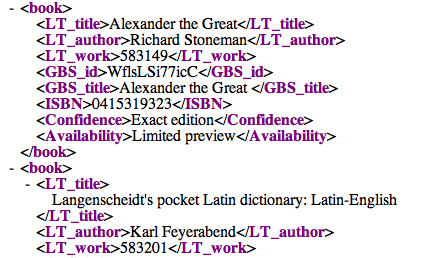
You can see and edit the data here. Full XML downloads of the data are also available there.


*Come to think of it, it works like Google.
**The system is overzealous. It often refuses to show me Google Blog Search pages in Firefox because I look at LibraryThing’s blog coverage too much.
***It’s quite amazing what a bookmarklet can do. We could have never done it if Altay hadn’t shown us the way in this sort of Javascript. The script itself is, however, pretty amateurish–a notice attempt at what Altay did expertly.

As we put on the bookmarklet: “Google and Google Book Search are registered trademarks of Google. LibraryThing is not affiliated in any way with Google or the many libraries that have so generously provided Google with their books and bibliographic metadata, although we share a love of books, a desire to make information as freely available as possible, and similar opinions about evil.”

Labels: features, google, google book search, new feature, new features