Archive for the ‘new features’ Category

Tuesday, January 28th, 2025

New Work Page!

We’re excited to announce a major update to LibraryThing’s work pages—the pages you use to look at a work, edit your book, read reviews, get recommendations, etc. These pages are now easier to use and more informative.

Here’s some links to check it out:

Nobody likes change, so our goal was to improve work pages while keeping them familiar. We hope members aren’t too shocked, but come to love the new pages as much as we do.

The new work page was spearheaded by Chris (conceptdawg) and Lucy (knerd.knitter). They did a ton of great work to get us here! The missing element, however, is your reaction and suggestions for improvement, so come tell us what you think and talk about the changes on New Features: New Work Page!.

Major Improvements

  • “LT2” — Work pages join most other LibraryThing pages in being consistently formatted, fully “mobilized,” and accessible.
  • Your Books — The “Your Books” part of work pages is much improved, with better editing and the ability to choose which fields you want to see.
  • Quick Facts — We created a “Quick Facts” section on the right, with some of the key details, including publication year, genres and classifications. It works something like the info boxes on Wikipedia pages.
  • Side Bar — Besides “Quick Facts,” we’ve improved the right side panel with a popularity graph, a links section, author info and an improved share button.
  • Reviews — Reviews are now displayed and sorted better, with reviews from your friends and connections first. After that, we’re sorting reviews by a quality metric, incorporating thumbs-up votes, recentness and member engagement. Ratings have also been added to the reviews section, in a section after full reviews. Altogether, we think reviews will prove more useful and interesting.
  • Sections — All work-page sections can be collapsed and reordered by members, and a special “On This Page” area lays out what’s on the page, with links to jump there.
  • Classification — We fronted something LibraryThing is best at—library data—by giving classifications a prominent place in “Quick Facts.” Work pages now also include a “Classification” page with detailed information and charts about the work’s tags and genres as well as positions within the library classifications DDC/MDS, LCC, and—a new one—BISAC, the classification system used by publishers and booksellers.
  • Member Info — Hovering over a member’s name now pops up a quick summary and preview of their profile page, much as hovering over a work pops up a summary and preview of the work page. We’re testing this out here, but will expand it across the site.
  • Helper Hub — The works page now has a Helper Hub, listing everyone who’s contributed to the work, and a separate Helper Hub page, listing contributions by type.
  • Member Descriptions — A new type of member description field has been added on the “Community” page which includes the current haikus, but also has added options for adding five word descriptions, emoji descriptions, and “bad” descriptions. As enough of these are added, they will be included in TriviaThing!
  • Speed — Work pages now load faster.

Smaller Improvements

  • The “Your Books” section on a work page is blue. If you are looking at someone else’s book, however, the box turns yellow—making it more obvious what’s going on.
  • The “Edit Book” button is now at the bottom of the blue “Your Books” section, rather than the lefthand panel. On the “Book Details” page, you can also switch from “View” to “Edit” to edit your book.
  • The “Book Edit” page has a number of clever changes, such as an intuitive way to indicate the character a book’s title should sort by.
  • The collections menu is now easy and quick, so you can select or deselect as many collections as you want before closing the popup.
  • The “Reviews” section now has a “Rating” selector, and a revamped “Language” menu.
  • When you have multiple editions of a book, you now get small cards under the main card, so you can switch between your copies easily.
  • The “Quick Links” section has been streamlined and simplified.
  • The work sections have been reordered somewhat. If you don’t like the current order, you can reorder the sections, and the changes will “stick” for you.
  • A “Statistics” section at the bottom of the page lists key facts, including some new ones, covering the media (paper, ebook, audiobook) and languages the book has been published in. We also count up the ISBNs, UPCs and ASINs of all the editions.
  • The ratings graph on the right now defaults to showing only full stars—with half-stars rounded up. You can click the graph to see half-stars.
  • Empty sections are now hidden by default. There’s a button at the bottom of the work page to unhide them.
  • As with some other, new pages, Common Knowledge now defaults to a “View” mode. Click “Edit” to see the more detailed editing interface. The button here “sticks” so if you want to keep it in “Edit,” that’s fine.
  • The addition of publisher BISAC standards was mentioned above. The addition also includes a full set of BISAC pages, separate from the work pages, like CRA > CRAFTS & HOBBIES > Candle Making.
  • The “Editions” page now allows searching and sorting.
  • The “Share” button includes Threads and BlueSky.

Incomplete Features and Questions

  • The “Covers” page has a few improvements, including a better pop-up for each cover, and color coding of cover quality, but a larger revamp is still to come.
  • We’re still working on the “Collections” edit, which currently lacks a button to create new collections.
  • We’ve pulled back on LCSH (Library of Congress Subject Headings). A new much-expanded subject system—way beyond LCSH—is coming.
  • We’re eager to get feedback on the “Member Info” sections. If you don’t like them at all, you can turn them off, together with our work popups under Disable work and member info boxes.

That’s it! Thank you for reading. We’re eager to know what you think on Talk!

Labels: new features

Tuesday, December 19th, 2023

Your LibraryThing 2023 Year in Review

2023 Year in Review graphic

We’ve just added a fun new page that wraps up your 20231 activity on LibraryThing.

Check out your Year in Review to see the highlights of what you’ve contributed on LibraryThing this year, including what you’ve read2 and added.

>> Your LibraryThing 2023 Year in Review

Your Year in Review answers all your most pressing questions, such as: how many IKEA Billy bookcases would be needed to store the books you added this year? Who were your top authors? Of the books you added, what had the earliest publication date? How many pages did you read this year? What colors are your 2023 books? How many Talk posts did you write? What were the top awards and honors for your books? What badges and medals did you earn?

You can share your Year in Review with others just by posting the URL, or by taking screenshots to highlight your favorite pieces (like the beautiful poster of book covers).

Take a peek at some of our Years in Review:

Check out some screenshots:

2023 Year in Review read graphic 2023 Year in Review added graphic 2023 Year in Review measure graphic 2023 Year in Review Dewey and color graphic 2023 Year in Review medals graphic

What do you think? This is the first year we’ve attempted a year-end wrap up, and we’d love your feedback. Join the discussion of the Year in Review page on Talk.


  1. These stats are based on data from January 1, 2023 through today. Have you added new books since we released Year in Review? Click the regenerate button at the bottom of the page to update your data. We’ll update it for everyone after December 31, 2023. ↩︎
  2. Data about books read is only displayed if you used reading dates to track your reading on LibraryThing. ↩︎

Labels: new features, Year in Review

Wednesday, June 3rd, 2020

Series Gets a Revamp

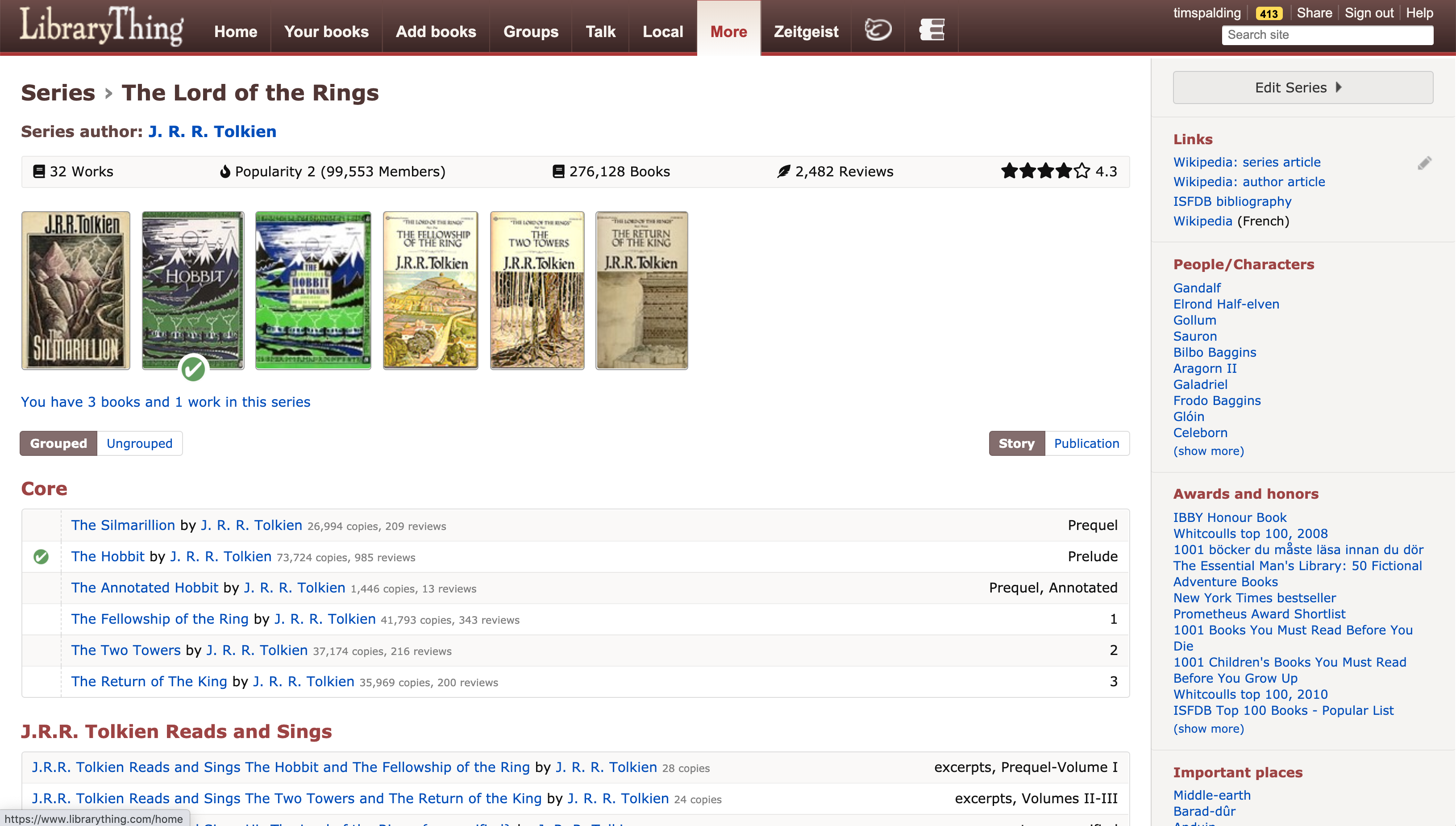
series_screenshot

Short Version

Today we roll out a new version of “Series” and “Publisher Series.” Here are some pages to check out:

We’re going to be discussing New Series starting from this Talk post.

The rest of this blog post explains the whys and wherefores in great detail.

“Old” Series

Before today, series were based on the Common Knowledge system. Common Knowledge is a simple “fielded wiki,” a system for keeping and tracking simple values.(1) To add a series to a work, you’d go to the common area of a work page and fill it out as follows:

bryson

It got complex quickly. Here’s one Star Wars book, with stuff inside parentheses for sorting and labeling.

starwars

Needless to say, an entry like “Star Wars (0.0112994350|88.5-22 BBY)” was inaccessible to many. Nor could works be added to a series on the actual series page. Series didn’t extend well to other languages—unless the names coincided, there was endless duplication of effort. A lack of any sort of grouping or subseries gummed up major series with edge-cases, like the re-segmentation of the Lord of the Rings applicable to only some Japanese editions, and made it tricky for users to look at a series and figure out what to read. And while some information came to adhere to series, the whole system was jerry-rigged. Finally, adding NEW features was truly impossible!

It is testimony to the passion and diligence of LibraryThing members over the last 13 years that they have added some 125,000 “regular” series and 30,000 “publisher” series!

“New Series”

New series starts with a more sophisticated data structure and user interface. Series exist as their own, complex entity, like works and authors are, not as series of Common Knowledge “strings.” This means:

  • Adding to series can be done on either work pages or series pages. (On work pages, series have been moved to the (renamed) “Series and work relationships” section.)
  • Sorting works within series is accomplished by dragging and dropping, or by giving the series a default sort, such as by publication or title.
  • Adding labels like “book one” can be done directly, not as part of a larger formula.

Series can now include “groups.” Every series has a “core” grouping, but can also include sections for omnibus editions, short stories, or anything else that—while useful—might be worthwhile to separate out. You can see this on the Lord of the Rings page.

The more sophisticated structure allows for other innovations:

  • A single series can serve across all of LibraryThing’s languages, with different names in different languages.(2)
  • Series can be combined and, in combining, the editor can choose which elements to bring over from one series to another.
  • Series can now be “related” to each other, much as works can be related to works. For example, the Harry Potter Movies can be listed as an adaptation of the famous novels.
  • Every series-related action is separately tracked for examination by members and staff—much like Common Knowledge but with all the extra detail available once single strings were abandoned.

“New Series” has also advanced LibraryThing’s “LT2” redesign project. In making the new pages, Chris Holland essentially worked out LT2 code and concepts, and applied them to a single page on “LT1.” He has learned a lot about how to recast LibraryThing pages without breaking everything.

Finally, series can now be touchstoned, just like authors and works! As works use single brackets, like [War and Peace], and authors use double-brackets, like [[J. K. Rowling]], series use three brackets like [[[Twilight Saga]]].

Future Plans

The near future will see:

  • Members able to follow a series, and see and receive updates when new books are released in that series.
  • “Publisher series” transformed by allowing these work-based lists to be narrowed down to the publishers and editions that pertain to them.

Can You Help?

Series needs your help! Old data needs cleaning up, and all sorts of new data needs adding.

  • We need your help finding bugs and improving existing features so they are maximally intuitive and useful.
  • We need help establishing best practices and norms for the new possibilities. For example, now that we have true series “relationships,” I favor removing adaptations from series and making them and their own series.
  • The biggest data problem is a surfeit of non-English variants. The Common Knowledge structure hid them, but members using LibraryThings other language sites, like LibraryThing.fr (French) and cat.LibraryThing.com (Catalan), created an enormous number of series too—most of them the same as the English series. They need to be combined. For example, before I combined them, the Twilight Saga also existed as “Houkutus” (Finnish), “Saga ‘Zmierzch'” (Polish), and “Crepúsculo” (Spanish).
  • The second biggest task is reviewing the “groups” within series. Omnibus editions and selections have been automatically assigned to a separate group with 95% accuracy, but other groupings have not been attempted.
  • There is a “Needs Help” / “Looks Good” control within the Edit dropdown menu. You can use this to flag the series as needing help or give approval that the series is currently in good shape.

Check It Out

Here are some links to check out!

Here are some links of interest to people who want to dig deeper:


Footnotes:

1. For more on Common Knowledge see our 2007 blog post.

2. Separate series should only be maintained if there is a difference between the series so great that combining them would mislead. This is one of those things we’ll have to hash out as a community.

Labels: common knowledge, new features, series

Monday, April 20th, 2020

New Syndetics Unbound Feature: Mark and Boost Electronic Resources

ProQuest and LibraryThing have just introduced a major new feature to our catalog-enrichment suite, Syndetics Unbound, to meet the needs of libraries during the COVID-19 crisis.

Our friends at ProQuest blogged about it briefly on the ProQuest blog. This blog post goes into greater detail about what we did, how we did it, and what efforts like this may mean for library catalogs in the future.

What it Does

The feature, “Mark and Boost Electronic Resources,” turns Syndetics Unbound from a general catalog enrichment tool to one focused on your library’s electronic resources—the resources patrons can access during a library shutdown. We hope it encourages libraries to continue to promote their catalog, the library’s own and most complete collection repository, instead of sending patrons to a host of partial, third-party eresource platforms.

The new feature marks the library’s electronic resources and “boosts,” or promotes, them in Syndetics Unbound’s discovery enhancements, such as “You May Also Like,” “Other Editions,” “Tags” and “Reading Levels.”

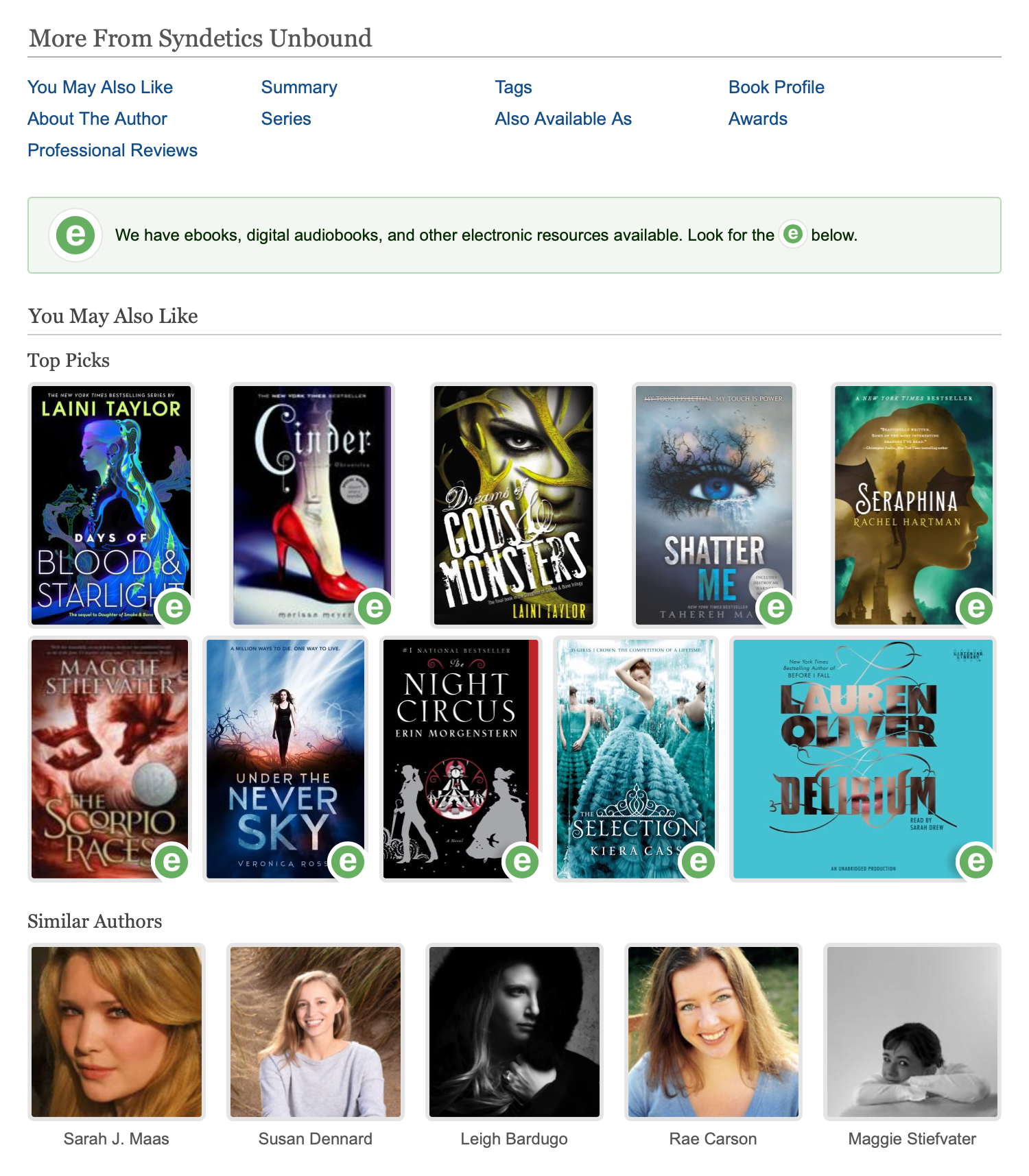
Here’s a screenshot showing the feature in action.

mab_screenshot

How it Works

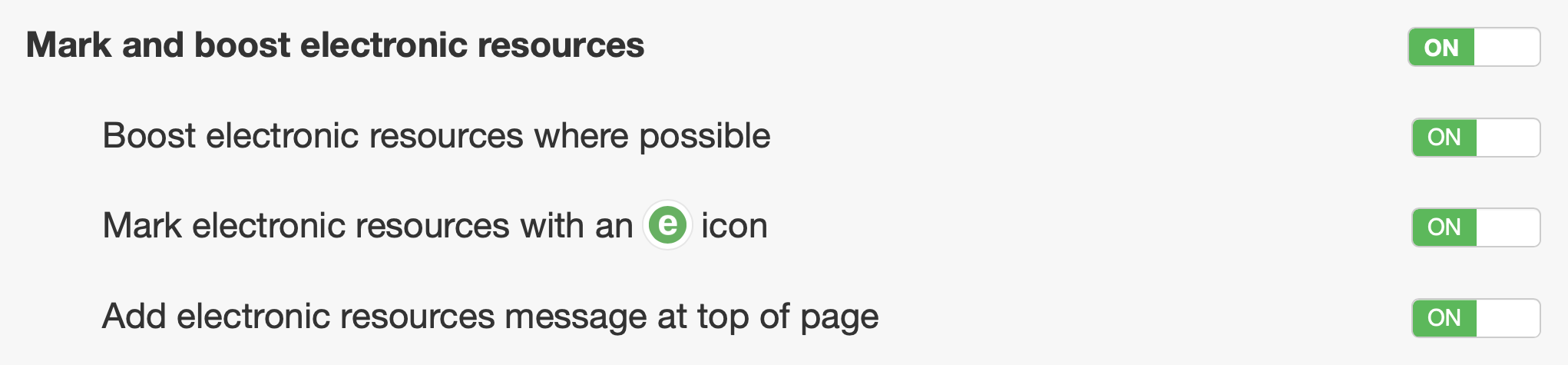
The feature is composed of three settings. By default, they all turn on together, but they can be independently turned off and on.

mab_buttons

  • Boost electronic resources chooses to show electronic editions of an item where they exist, and boosts such items within discovery elements.
  • Mark electronic resources with an “e” icon marks all electronic resources—ebooks, eaudio, and streaming video.
  • Add electronic resources message at top of page adds a customizable message to the top of the Syndetics Unbound area.

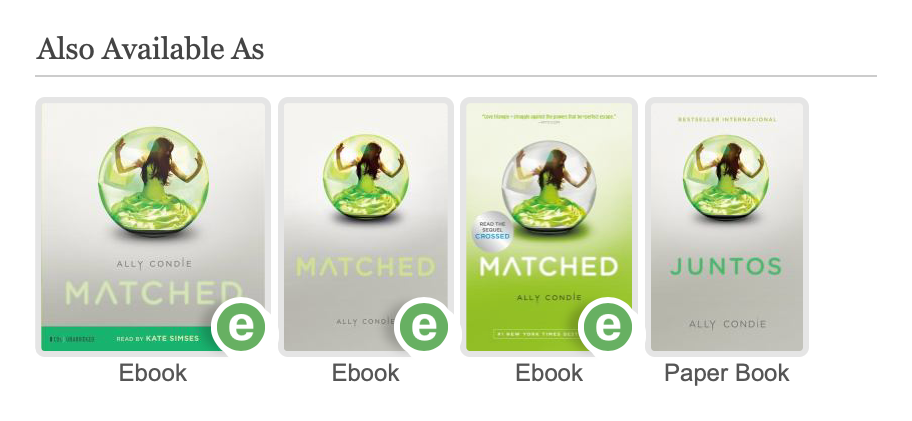
“Mark and Boost Electronic Holdings” works across all enrichments. It is particularly important for “Also Available As” which lists all the other formats for a given title. Enabling this feature sorts electronic resources to the front of the list. We also suggest that, for now, libraries may want to put “Also Available As” at the top of their enrichment order.

mab_alsoavailable

Why We Did It

Your catalog is only as good as your holdings. Faced with a world in which physical holdings are off-limits and electronic resources essential, many libraries have discouraged use of the catalog, which is dominated by non-digital resources, in favor of linking directly to Overdrive, Hoopla, Freegal and so forth. Unfortunately, these services are silos, containing only what you bought from that particular vendor.

“Mark and Boost Electronic Resources” turns your catalog toward digital resources, while preserving what makes a catalog important—a single point of access to ALL library resources, not a vendor silo.

Maximizing Your Electronic Holdings

To make the best use of “Mark and Boost Electronic Resources,” we need to know about all your electronic resources. Unfortunately, some systems separate MARC holdings and electronic holdings; all resources appear in the catalog, but only some are available for export to Syndetics Unbound. Other libraries send us holding files with everything, but they are unable to send us updates every time new electronic resources are added.

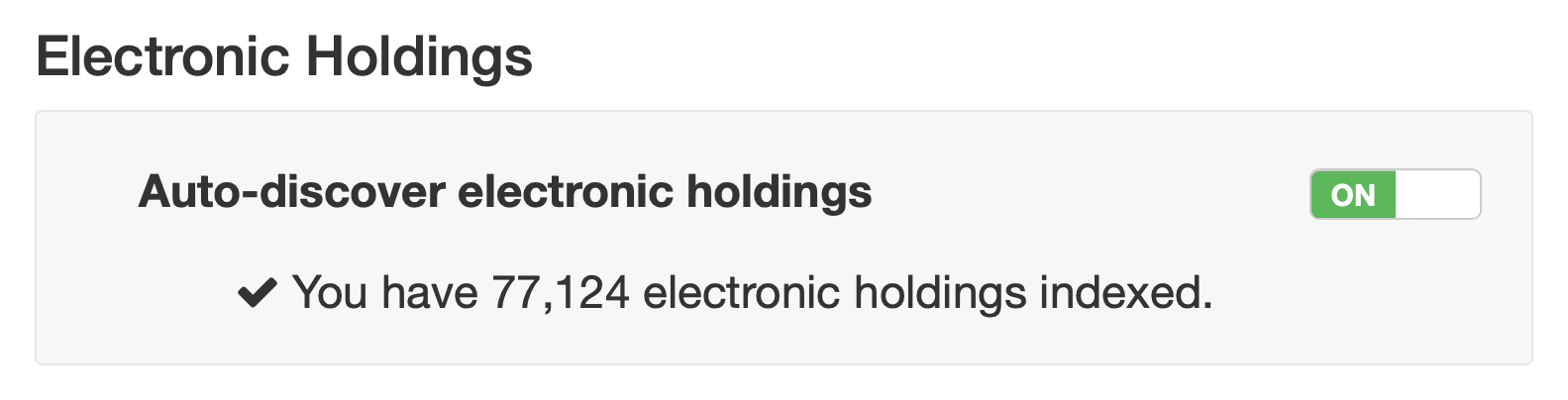
To address this issue, we have therefore advanced a new feature—”Auto-discover electronic holdings.” Turn this on and we build up an accurate representation of your library’s electronic resource holdings, without requiring any effort on your part.

mab_easyholdings

Adapting to Change

“Mark and Boost Electronic Resources” is our first feature change to address the current crisis. But we are eager to do others, and to adapt the feature over time, as the situation develops. We are eager to get feedback from librarians and patrons!

— The ProQuest and LibraryThing teams

Labels: new features, new product, Syndetics Unbound

Monday, March 12th, 2018

Introducing the LibraryThing Alexa Skill

Introducing the LibraryThing Skill for the Amazon Echo, Dot and other Alexa devices. Take a look:

The LibraryThing Alexa Skill is a weird but easy way to add books to your LibraryThing account. Just stand in the foyer, with a bag of new books, or on top of a rickety bookshelf ladder in the attic, and say:

Alexa, tell LibraryThing to add [Book Title] by [author]

And Alexa will add the book. Or it will try to. It’s not perfect.

To get a higher success rate, skip the title and author and just read the barcode, or ISBN number, off the back of your book:

Alexa, tell LibraryThing to add [Barcode or ISBN number]

There are a few other commands. Try:

Alexa, ask LibraryThing how many books I have.

To dazzle your friends with your intelligent personal assistant and your impressive library.

What Else?

Have fun!


Credits:

  • The Alexa app was coded up by Chris Holland (@conceptdawg), who did a bang-up job, with an immature programming environment.
  • Thanks to Abby and Puck (pictured) for the video.

Labels: app, new features

Monday, July 24th, 2017

Your Library in Dewey

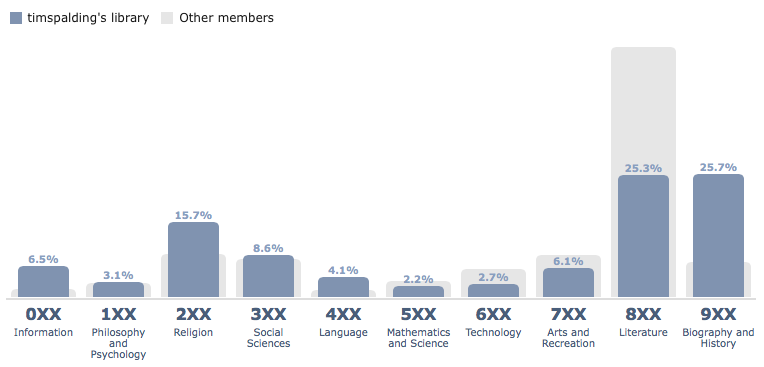
We’ve made a handy graphical way to see how your library matches up with Dewey®.

The Dewey Decimal System®, also called the Dewey Decimal Classification® (DDC)—called the “Melvil Decimal System” on LibraryThing for legal reasons—is the classification used by most public libraries, especially in the US. First developed in 1876, it divides the world into ten major categories 0-9. Each of these are further subdivided 0-9 again, twice, yielding a number between 000 and 999. Further division is accomplished by adding a decimal point (.) and adding more decimals. It’s imperfect, but it’s simple—and it’s everywhere.

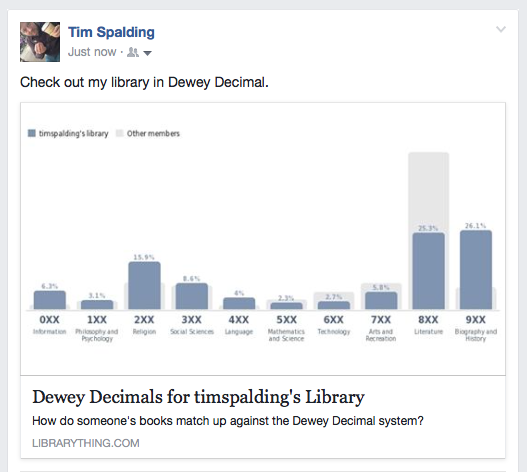
Here’s what it looks like on the top level. I have a lot of history and religion. True enough.

Screenshot 2017-07-24 12.00.11

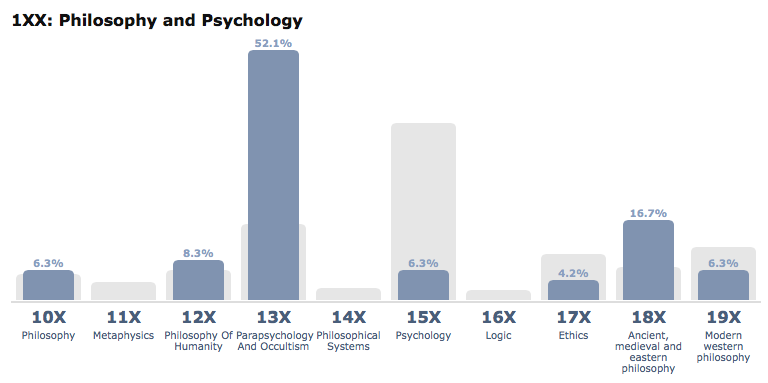
Here’s one level down. Did someone say “occult”?
Screenshot 2017-07-24 11.56.00

Here’s what it looks like posted to Facebook:
Screenshot 2017-07-24 12.04.58

“Dewey,” “Dewey Decimal,” “Dewey Decimal Classification” and “DDC” are registered trademarked of OCLC, an Ohio-based library cartel.

Labels: classification, new features

Tuesday, June 13th, 2017

The LibraryThing Android App is here!

UPDATE: LT staffer Loranne did some speed cataloging to put the app through its paces. Check out the video!

Meet the official LibraryThing Android App!

What does it do? The LibraryThing Android app mirrors our iPhone/iOS app. Among other things, you can:

  • Browse and search your library overall and by collection.
  • Add books, CDs, and DVDs by scanning barcodes. The barcode scanning is SUPER FAST!
  • Add items by searching by title, author, ISBN, etc.
  • Browse and upload covers, using your Android’s camera.
  • Do minor editing, such as adding books to collections and rating them. Major editing is done by a link to LibraryThing.com.

Free accounts. We’re giving away lifetime memberships to anyone who uses the app. Register for a new account using the LibraryThing App, or sign into the app with an existing account, and you’ll be automatically upgraded.

Check out the app at https://play.google.com/store/apps/details?id=com.librarything.librarything&hl=en

Come tell us what you think, and join the discussion on Talk. Need help? Check out our App Help Page.

Our Android app has been a long time coming, and we’re pretty happy with it! Many thanks to our members who helped us fine tune things with the pre-release alpha version.

Frequently Asked Questions

What devices are supported?
Android devices running 4.0.3 (Ice Cream Sandwich – circa October 2011) or later.

Does it work on wifi? Offline?
Wifi, you bet. Offline, no. This is a much-requested feature, but not likely to come any time soon.

Is there an [other-OS] version of the app?
The iPhone/iOS app is available here. We do not plan to make apps for other systems.

Can I use it on my tablet?
It’s designed for a phone, but will work on your Android tablet, too. NB: some tablet cameras don’t have a built in flash, so you’ll want to make sure you’re scanning barcodes in a well-lit room.

Will you add this feature?
The app will never do everything, but future versions will do more. Your feedback is welcome on this Talk topic.

Problems with the app?
Post any issues you run into on the bug report.

Labels: app, new features

Wednesday, May 3rd, 2017

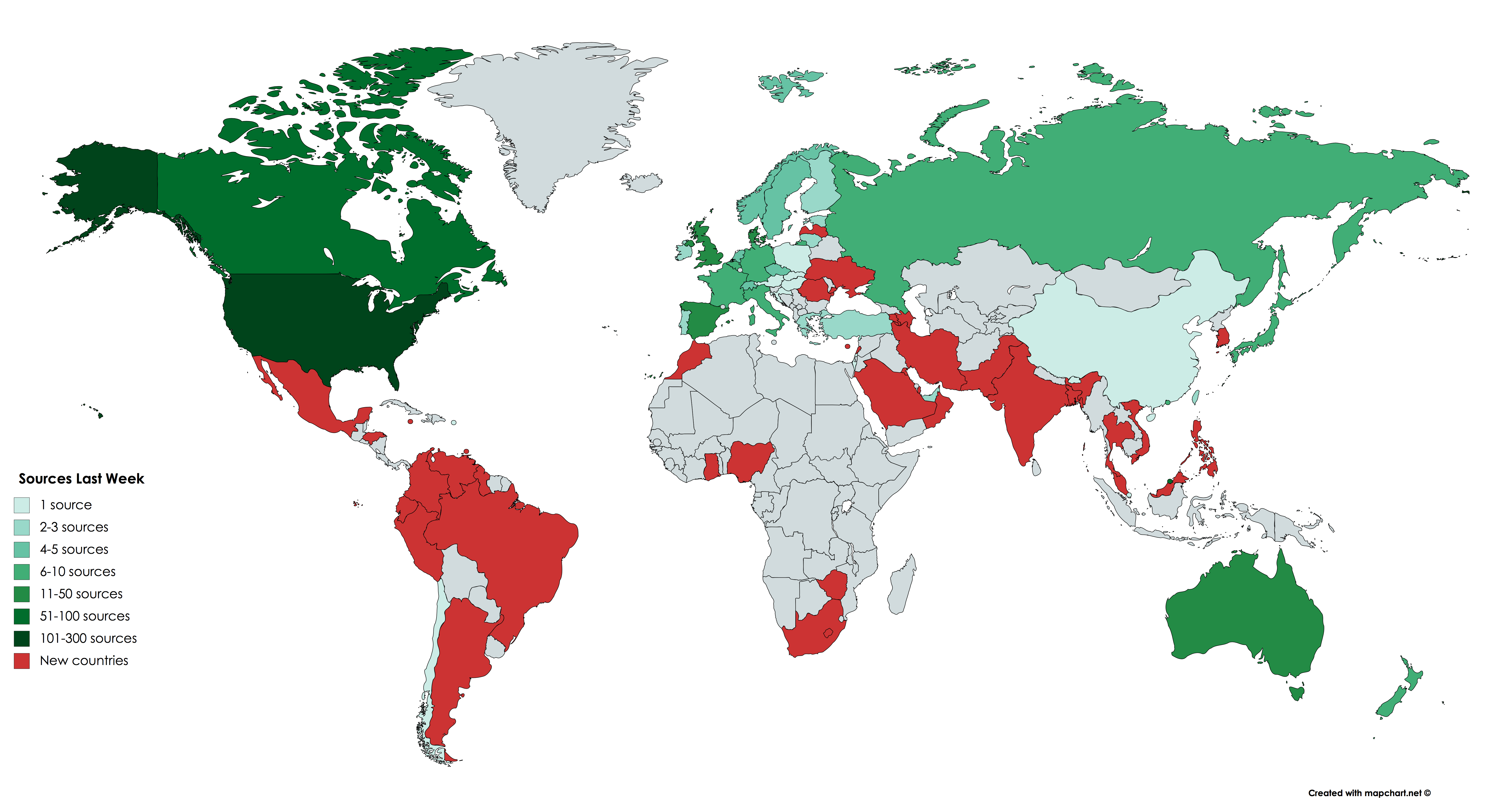
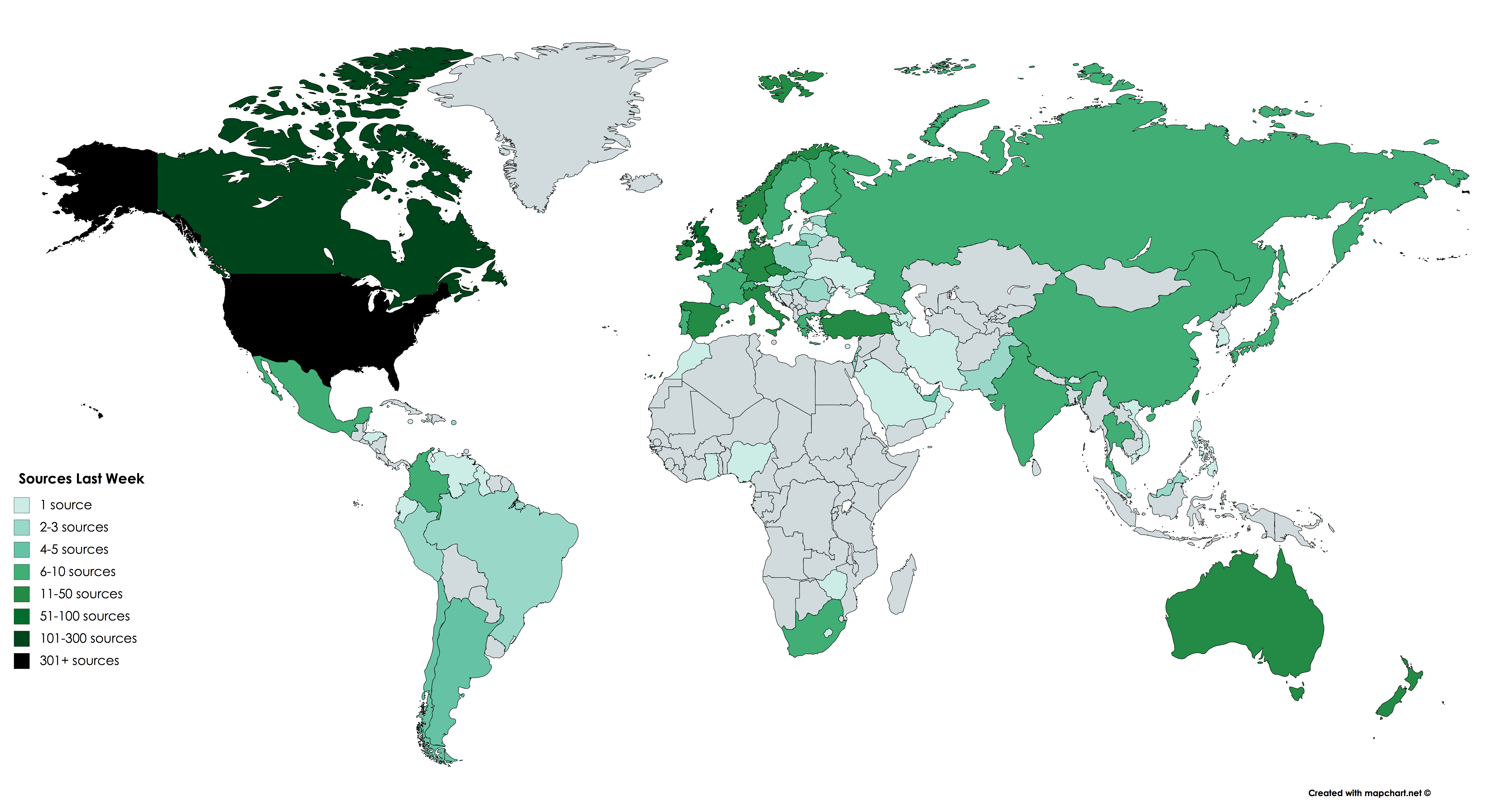
BOOM! Add Books Adds 749 Library Sources, 38 New Countries

UPDATE: As of today (May 19th), we’ve reached a grand total of 2,160 working library sources, covering 110 countries! See the updated map at right reflecting our latest stats. New countries include: Ethiopia, Egypt, Bahrain, Nepal, Belarus, Luxembourg, (Northern) Cyprus, and the US Virgin Islands.


Last week we announced six new data sources: Amazon in India, Brazil, Italy, Mexico, Spain and China.

Today we’re announcing a far larger advance in sources—a leap from 426 working library sources last week to 1,175 working library sources today! For this, as we will explain, we have LT members to thank.

All told, we’ve gone from sources in 40 countries before, to sources in 78 countries now, covering many new regions and languages.

Entirely new sources total 668, but another 81 were fixed—sources that had died sometime in recent years. Other “working” sources were tweaked, fixing search and character-set problems.

Dead sources accumulated because LibraryThing didn’t have the staff resources, or a good system to monitor and edit existing sources. We now have a new, interactive system for adding, editing and testing library sources. And we have also opened this up to members, starting with a hand-picked set of librarians and library workers with experience handling these systems (z39.50 servers).

We expected we’d get help, but we were astounded by how much. Top honors go to davidgn, who added more than 500 new libraries, and fixed many as well. Members lesmel and bnielsen also contributed considerably, together with LT staffer Chris Catalfo, who wrote the code for the new system. A round of applause for all!

New Sources, New Countries, New Languages

At the top of this post is an animation demonstrating the growth of the sources—initial sources, new countries (red), and finally, where we are today.You can see the individual frames here, here, and here.

You can see big advances in Central and South America, which went from one source in one country to 35 sources in nine countries. Africa went from 0 countries to six, and many were added in Eastern Europe, the Middle East, and East Asia. The countries that already had many sources also grew—the UK went from 44 to 60, Canada from 42 to 106 and the USA from 261 to 544! (The generosity and public-spiritedness of American public and academic libraries in providing open z39.50 connections is truly remarkable.)

Some of the most useful and important new sources are:

North America: Brooklyn Public Library, California State Library, Massachusetts Historical Society (USA), National Library Service for the Blind and Physically Handicapped (USA), Maine State Library (Maine), Vancouver Public Library (Canada), University of Toronto (Canada), University of Waterloo (Canada), University of Ottawa (Canada), Instituto Politécnico Nacional (Mexico).

South America: Pontificia Universidad Javeriana (Colombia), Biblioteca Nacional Mariano Moreno (Argentina), Universidade de São Paulo (Brazil), Pontificia Universidad Católica del Perú (Peru).

Europe: London School of Economics (UK), University of Warwick (UK), University of Cyprus (Cyprus), Armenian Libraries Union Catalog (Armenia), FENNICA and VIOLA, the national bibliography and discography of Finland, Latvian Academic Union Catalog, Biblioteca Nacional de Portugal (Portugal), Universidade de Coimbra (Portugal), Universitat Politècnica de Catalunya (Spain/Catalonia), Universidad de Sevilla (Spain).

Africa and the Middle East: University of Ghana, American University of Kuwait, American University of Beirut, University of Lagos (Nigeria), Qatar Faculty of Islamic Studies, Sultan Qaboos University (Oman), National University of Lesotho, Ege Üniversitesi (Turkey).

Asia and Oceanea: University of Melbourne (Australia), Okayama University (Japan), National Taiwan University, University of Macao, Africa University (Zimbabwe).

A New, User-Editable Sources System

As mentioned above, the updates were made possible by a new system which allows select LibraryThing members to edit and add library sources. Those members are able to change any out of date connection parameters, which have been a perennial problem as libraries change systems and settings over time.

See the screenshots on the right for how it works.

How can you help?

Post your feedback and questions on Talk. If you have a library you’d like to be able to use in cataloging your books here on LibraryThing, post them on that same Talk thread! Going forward, you can post about it in the Recommended Site Improvements group at any time.

If you’re a librarian or library professional who’d like to help with updating and adding new sources, get in touch with our developer Chris Catalfo (ccatalfo) and we’ll add you to the group Library Add Books Sources Maintenance, which opens up source editing. Because the details are so technical, and there’s some danger of messing things up, we’re making group membership by request only.

Labels: cataloging, new features

Friday, April 21st, 2017

Six New Sources: Amazon India, Italy, Brazil, Spain, Mexico, and China

We’re pleased to announce the addition of six new Amazon sites to LibraryThing’s cataloging sources. They are:

This is big news, because although we’ve had academic library sources for these countries and languages, Amazon has far more books for most readers, and is always faster.

UPDATE: Books, Music, and Movies

Initially these sources were available for books only. However, we’ve now added movies and music data from all but one of them. Amazon Brazil only has data for books available. Amazon India, Italy, Spain, Mexico, and China all have the option to search their books, music, and movies data.

To use them, go to Add Books, look under “Search where?” on the left-hand side of the page, and click “Add from 1077 sources.”

If you run into any issues, or have other feedback or questions, post them on Talk.

LibraryThing in Not-English?

Many members don’t know, but LibraryThing is available in more than a dozen languages, including ones for the new sources:

All translations have been done by members—an amazing amount of love and effort. Other sites include French, Germany, and our best-maintained translation, Catalan. See all of them.

Labels: cataloging, new features

Thursday, October 27th, 2016

Introducing Syndetics Unbound

oa_logo_425w

Short Version

Today we’re going public with a new product for libraries, jointly developed by LibraryThing and ProQuest. It’s called Syndetics Unbound, and it makes library catalogs better, with catalog enrichments that provide information about each item, and jumping-off points for exploring the catalog.

To see it in action, check out the Hartford Public Library in Hartford, CT. Here are some sample links:

We’ve also got a press release and a nifty marketing site.

UPDATE: Webinars Every Week!

We’re now having weekly webinars, in which you can learn all about Syndetics Unbound, and ask us questions. Visit ProQuest’s WebEx portal to see the schedule and sign up!

Long Version

oa_sample2

The Basic Idea

Syndetics Unbound aims to make patrons happier and increase circulation. It works by enhancing discovery within your OPAC, giving patrons useful information about books, movies, music, and video games, and helping them find other things they like. This means adding elements like cover images, summaries, recommendations, series, tags, and both professional and user reviews.

In one sense, Syndetics Unbound combines products—the ProQuest product Syndetics Plus and the LibraryThing products LibraryThing for Libraries and Book Display Widgets. In a more important sense, however, it leaps forward from these products to something new, simple, and powerful. New elements were invented. Static elements have become newly dynamic. Buttons provide deep-dives into your library’s collection. And—we think—everything looks better than anything Syndetics or LibraryThing have done before! (That’s one of only two exclamation points in this blog post, so we mean it.)

Simplicity

Syndetics Unbound is a complete and unified solution, not a menu of options spread across one or even multiple vendors.

This simplicity starts with the design, which is made to look good out of the box, already configured for your OPAC and look.

The installation requirements for Syndetics Unbound are minimal. If you already have Syndetics Plus or LibraryThing for Libraries, you’re all set. If you’ve never been a customer, you only need to add a line of HTML to your OPAC, and to upload your holdings.

Although it’s simple, we didn’t neglect options. Libraries can reorder elements, or drop them entirely. We expect libraries will pick and choose, and evaluate elements according to patron needs, or feedback from our detailed usage stats. Libraries can also tweak the look and feel with custom CSS stylesheets.

And simplicity is cheap. To assemble a not-quite-equivalent bundle from ProQuest’s and LibraryThing’s separate offerings would cost far more. We want everyone who has Syndetics Unbound to have it in its full glory.

Comprehensiveness and Enrichments

Syndetics Unbound enriches your catalog with some sixteen enrichments, but the number is less important than the options they encompass. These include both professional and user-generated content, information about the item you’re looking at, and jumping-off points to explore similar items.

Quick descriptions of the enrichments:

enrichment-screenshots_0000_1-cover-images

Boilterplate covers for items without covers.

Premium Cover Service. Syndetics offers the most comprehensive cover database in existence for libraries—over 25 million full-color cover images for books, videos, DVDs, and CDs, with thousands of new covers added every week.

For Syndetics Unbound, we added boilerplate covers for items that don’t have a cover, which include the title, author, and media type.

Summaries. Over 18 million essential summaries and annotations, so patrons know what the book’s about.

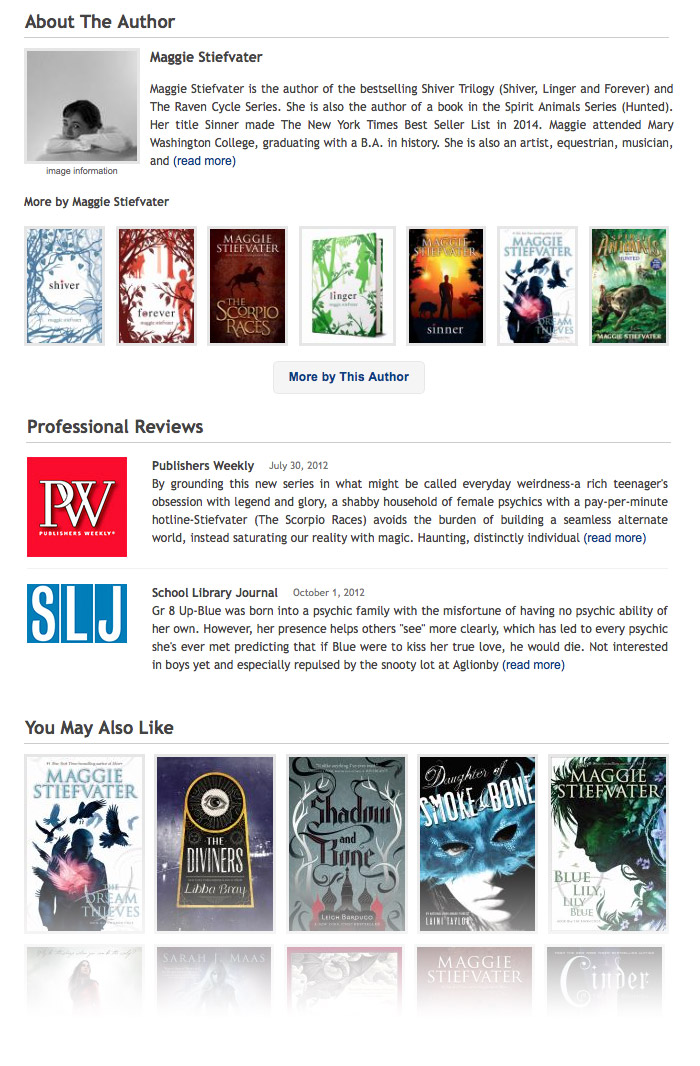
About the Author. This section includes the author biography and a small shelf of other items by the author. The section is also adorned by a small author photo—a first in the catalog, although familiar elsewhere on the web.

Look Inside. Includes three previous Syndetics enrichments—first chapters or excerpts, table of contents and large-size covers—newly presented as a “peek inside the book” feature.

Series. Shows a book’s series, including reading order. If the library is missing part of the series, those covers are shown but grayed out.

You May Also Like. Provides sharp, on-the-spot readers advisory in your catalog, with the option to browse a larger world of suggestions, drawn from LibraryThing members and big-data algorithms. In this and other enrichments, Syndetics Unbound only recommends items that your library owns.

The Syndetics Unbound recommendations cover far more of your collection than any similar service. For example, statistics from the Hartford Public Library show this feature on 88% of items viewed.

Professional Reviews includes more than 5.4 million reviews from Library Journal, School Library Journal, New York Times, The Guardian, The Horn Book, BookList, BookSeller + Publisher Magazine, Choice, Publisher’s Weekly, and Kirkus. A la carte review sources include Voice of Youth Advocates: VOYA, Doody’s Medical Reviews and Quill and Quire.

Reader Reviews includes more than 1.5 million vetted, reader reviews from LibraryThing members. It also allows patrons and librarians to add their own ratings and reviews, right in your catalog, and then showcase them on a library’s home page and social media.

Also Available As helps patrons find other available formats and versions of a title in your collection, including paper, audio, ebook, and translations.

enrichment-screenshots_0010_10-tags

Exploring the tag system

Tags rethinks LibraryThing’s celebrated tag clouds—redesigning them toward simplicity and consistency, and away from the “ransom note” look of most clouds. As data, tags are based on over 131 million tags created by LibraryThing members, and hand-vetted by our staff librarians for quality. A new exploration interface allows patrons to explore what LibraryThing calls “tag mashes”—finding books by combinations of tags—in a simple faceted way.

I’m going to be blogging about the redesign of tag clouds in the near future. Considering dozens of designs, we decided on a clean break with the past. (I expect it will get some reactions.)

Book Profile is a newly dynamic version of what Bowker has done for years—analyzing thousands of new works of fiction, short-story collections, biographies, autobiographies, and memoirs annually. Now every term is clickable, and patrons can search and browse over one million profiles.

enrichment-screenshots_0012_12-reading-level

Explore Reading Levels

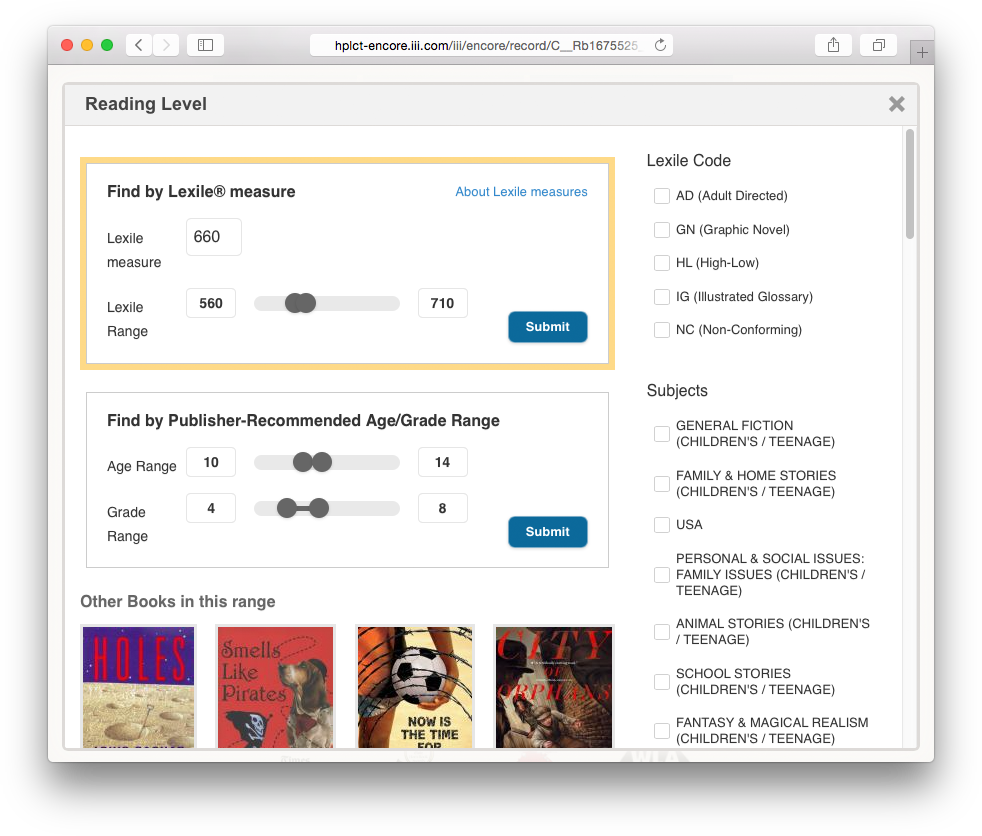
Reading Level is a newly dynamic way to see and explore other books in the same age and grade range. Reading Level also includes Metametrics Lexile® Framework for Reading. Click the “more” button to get a new, super-powered reading-level explorer. This is one my favorite features! (Second and last exclamation point.)

Awards highlights the awards a title has won, and helps patrons find highly-awarded books in your collection. Includes biggies like the National Book Award and the Booker Prize, but also smaller awards like the Bram Stoker Award and Oklahoma’s Sequoyah Book Award.

Browse Shelf gives your patrons the context and serendipity of browsing a physical shelf, using your call numbers. Includes a mini shelf-browser that sits on your detail pages, and a full-screen version, launched from the detail page.

Video and Music adds summaries and other information for more than four million video and music titles including annotations, performers, track listings, release dates, genres, keywords, and themes.

Video Games provides game descriptions, ESRB ratings, star ratings, system requirements, and even screenshots.

Book Display Widgets. Finally, Syndetics Unbound isn’t limited to the catalog, but includes the LibraryThing product Book Display Widgets—virtual book displays that go on your library’s homepage, blog, LibGuides, Facebook, Twitter, Pinterest, or even in email newsletters. Display Widgets can be filled with preset content, such as popular titles, new titles, DVDs, journals, series, awards, tags, and more. Or you point them at a web page, RSS feed, or list of ISBNs, UPCs, or ISSNs. If your data is dynamic, the widget updates automatically.

Here’s a page of Book Display Widget examples.

Find out More

Made it this far? You really need to see Syndetics Unbound in action.

Check it Out. Again, here are some sample links of Syndetics Unbound at Hartford Public Library in Hartford, CT: The Raven Boys by Maggie Stiefvater, Alexander Hamilton by Ron Chernow, Faithful Place by Tana French.

Webinars. We hold webinars every Tuesday and walk you through the different elements and answer questions. To sign up for a webinar, visit this Webex page and search for “Syndetics Unbound.”

Interested in Syndetics Unbound at your library? Go here to contact a representative at ProQuest. Or read more about at the Syndetics Unbound website. Or email us at ltflsupport@librarything.com and we’ll help you find the right person or resource.

Labels: librarything for libraries, new feature, new features, new product

Monday, August 15th, 2016

New Feature: True Excel Export

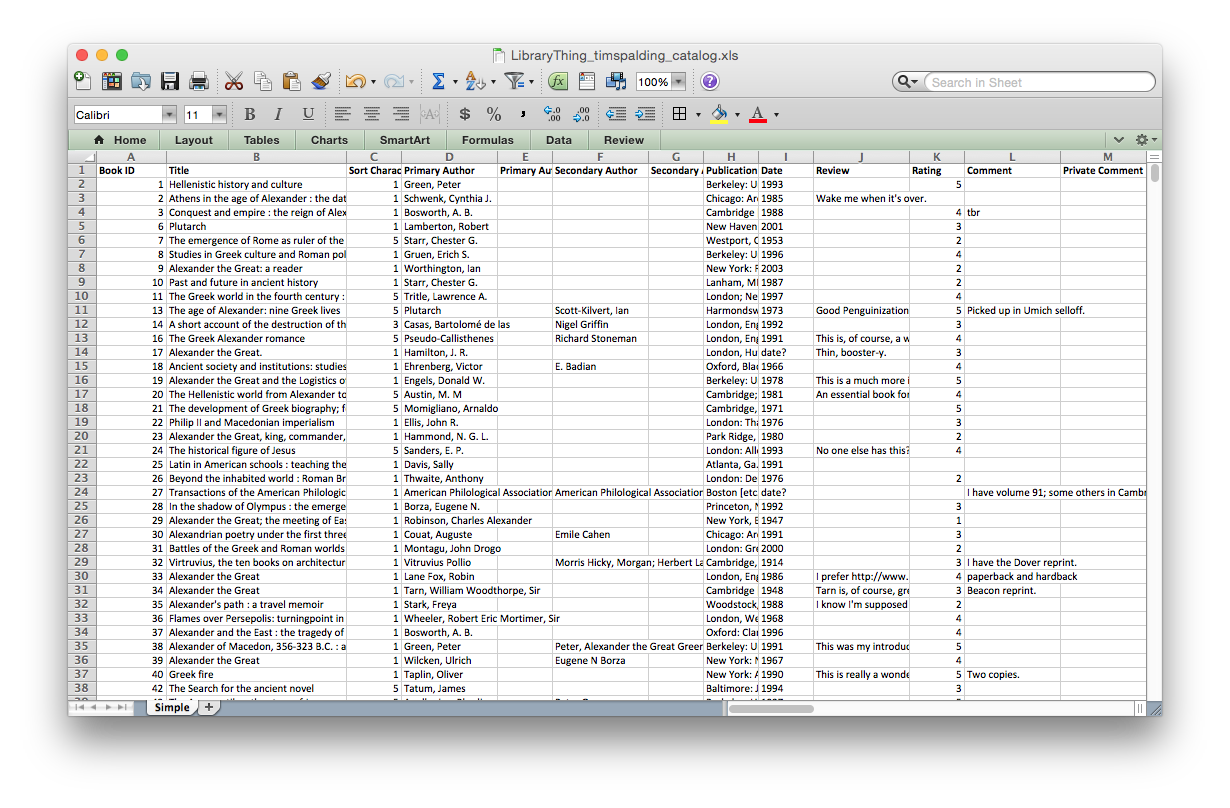
After years of CSV and TSV exports, we’ve added a “true” Excel export for your catalog. Find yours here: https://www.librarything.com/export.php?export_type=xls.

It’s a minimal, simple implementation. We made the headings bold, changed some column widths and defined some columns as text and some as numbers, but otherwise left the data as-is. We tested it out, but there are so many versions of Excel out there, that we’d appreciate feedback from members too.

Let us know what you think in Talk.

Screenshot 2016-08-15 15.39.59

Labels: export, new features

Monday, October 19th, 2015

LibraryThing App!

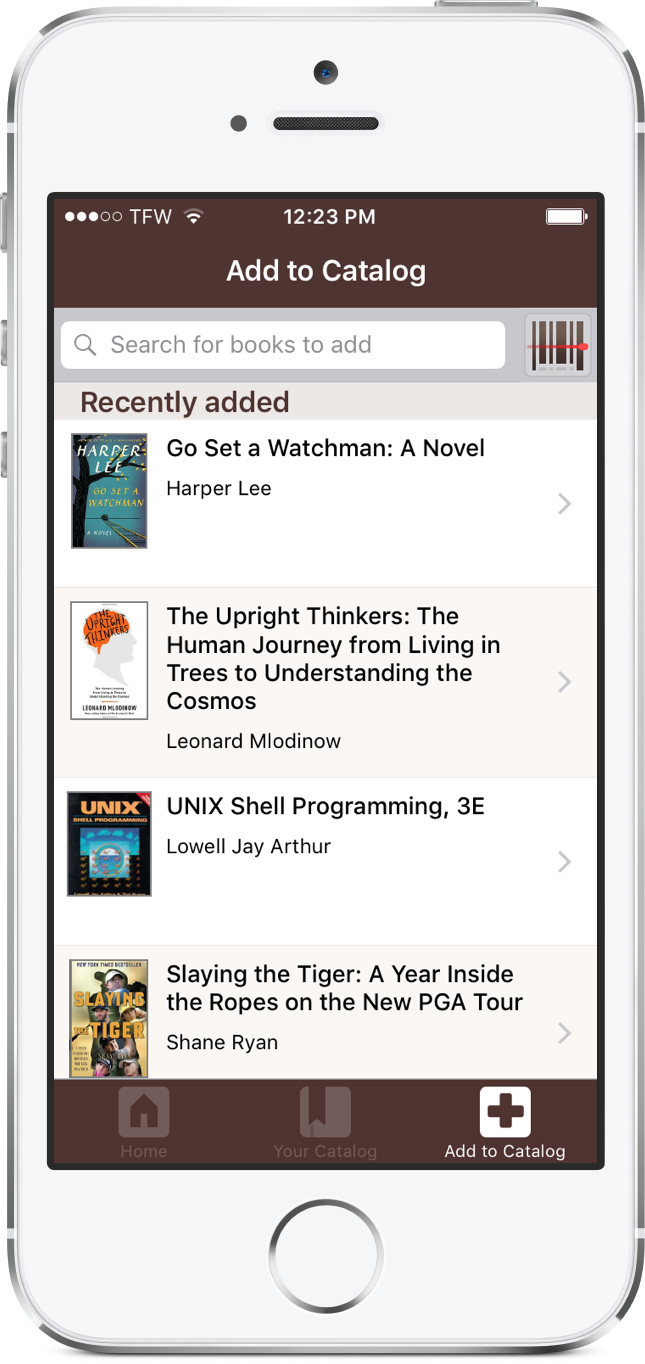
recentlyadded_275

We’re thrilled to announce the official LibraryThing iPhone App!

Free accounts. We’re giving away lifetime memberships to anyone who uses the app for the next month. Register for a new account using the LibraryThing App, or sign into the app with an existing account, and you’ll be automatically upgraded.

What it does. This is our first version, so we’ve limited it to doing the most basic functions you’ll need for cataloging on the go:

  • Browse and search your library.
  • Add books by scanning barcodes. Scanning to add is VERY FAST!
  • Add books by searching.
  • Browse and upload covers, using the iPhone camera.
  • Do minor editing, such as changing collections and ratings. Major editing sends you to LibraryThing.

Check out the app at https://itunes.apple.com/us/app/librarything/id948824489?mt=8

Come tell us what you think, and join the discussion on Talk. Need help? Check out our App Help Page.

Frequently Asked Questions

Is there an Android version of the app?
Not yet. With luck, we’ll do that next. Tim outlined some of the key reasons why we did iPhone first here.

Does it work on wifi? Offline?
Wifi, you bet. Offline, no.

Can I use it on my iPad?
It’s designed for the iPhone, but works on the iPad. NB: iPad cameras don’t have a built in flash, so you’ll want to make sure you’re scanning barcodes in a well-lit room.

Will you add X, Y, or Z features?
The app will never do everything, but future versions will do more. Your feedback is welcome on this Talk topic.

Labels: app, new features